Small Business Inventory Software
Enter cost, sale price, supplier and reorder level; get margins, stock value and a purchase order for each supplier.
Free · runs in your browser · nothing is uploaded
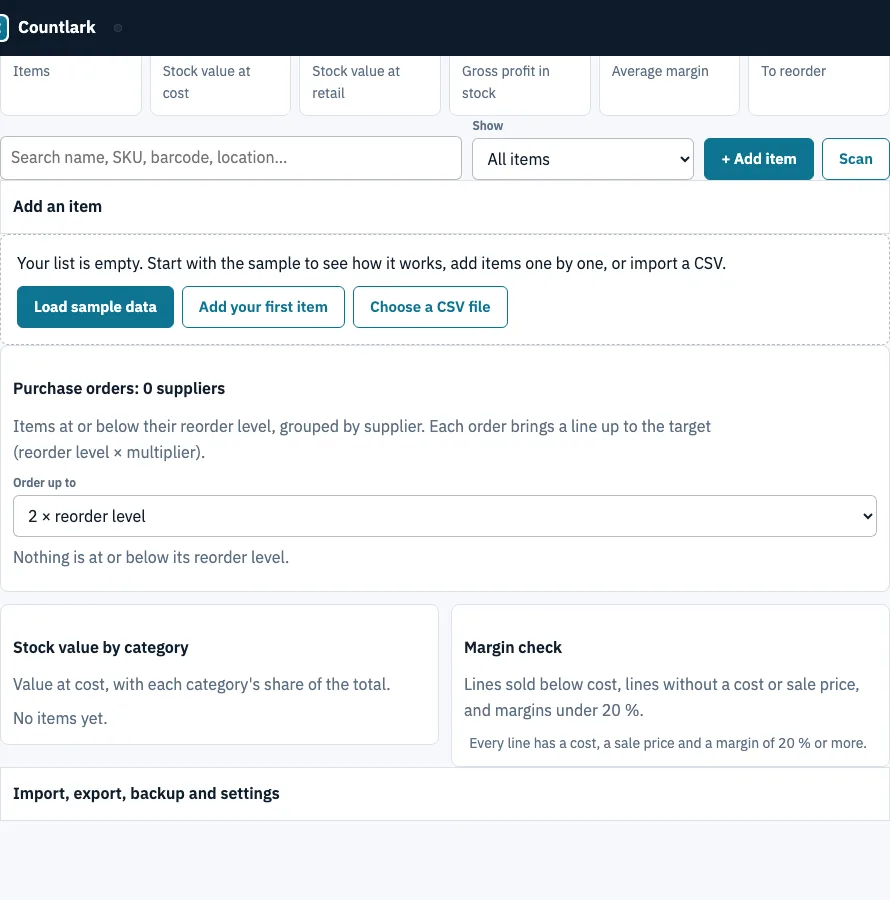
How to use the small business inventory tool
- Click Load sample data to see a filled list, or + Add item to start your own. In the quick-add form, Enter adds the item and returns you to the first box.
- Fill in Item, SKU, Category, Supplier, On hand, Unit cost, Sale price and Reorder at. Click any cell to edit it.
- Read the Margin column and the dashboard: Items, Stock value at cost, Stock value at retail, Gross profit in stock, Average margin and To reorder.
- Open the Purchase orders panel and choose an Order up to level: 1.5 x, 2 x, 3 x or 4 x the reorder level.
- Click Purchase order (.csv) under a supplier, or Copy for plain text to paste into an e-mail. Use All orders in one CSV to get every supplier at once.
- To bring in a spreadsheet, open Import, choose a CSV file or paste cells, click Check columns, then pick one of the three import modes.
- Click Download backup (.json) regularly, because clearing browser data deletes the list.
Press Enter to save a cell and move down its column, Shift+Enter to move up, and Escape to restore the old value. Click a column header to sort. The Scan button opens your camera, and a USB or Bluetooth scanner also works. For exports, use CSV of this view, Download Excel (.xlsx) or CSV with every field.
Which inventory system is best for small business?
The best system depends on how many items you hold, how many people edit the list, and whether it must connect to your sales or accounting software. A spreadsheet has no item limit but no scanning or reorder grouping unless you build them. The table compares common options using figures from competitor pages read on 25 October 2026.
| Option | Cost | Limits | Where it stops |
|---|---|---|---|
| Spreadsheet | Usually nothing extra | No item limit | No scanning, no movement log, no reorder grouping unless you build it |
| Sortly free plan | Free | 100 items, 1 user | Stops at 100 items and 1 user |
| Zoho Inventory free plan | Free | 50 orders a month | Stops at 50 orders a month |
| Sortly paid plans | From $24 a month in year one | Not listed here | Paid plans start at $24 a month in year one |
| QuickBooks Online Plus | $70 a month | Includes inventory | Costs more than the other options listed |
| Countlark (this page) | Free | One browser, one device, one person at a time | No sync between phones, no user permissions, no POS or accounting link |
Where this tool stops: it keeps one list in one browser for one person. Paid software makes more sense when several people need the list, you need it synced across devices, or you need a link to sales or accounting records. This page offers none of those.
How much should I order when stock runs low?
Each supplier’s order quantity is the target stock minus what you have on hand, rounded up. The target is the reorder level multiplied by your Order up to choice. Items at or below their reorder level appear in the Purchase orders panel, grouped by supplier.
Here is the sample shop at 2 x:
| Supplier | Item | Order quantity | Line total |
|---|---|---|---|
| Leaf & Co | Green tea tins | 22 | 52.80 |
| Loom & Thread | Black tote bags | 46 | 64.40 |
| Northfield Ceramics | Green mugs | 28 | 89.60 |
The three lines add up to 206.80 across 96 units. At 3 x the quantities become 37, 71 and 48. The Excel export’s Reorder sheet calculates each line total as order quantity times unit cost, so you can check the figures yourself.
Frequently asked questions
What is small business inventory software?
It tracks how much stock you hold, what it costs and sells for, and when to reorder. This page keeps these in one list with SKU, category, supplier, on-hand count and reorder level, and calculates stock value and margin.
What is the best inventory POS software for small businesses?
That depends on whether your stock must update automatically from sales. This page does not connect to POS software, so it suits a stock list you update yourself.
Is free inventory software really free?
This page is free and needs no account. Other free plans have limits, such as Sortly’s 100 items and 1 user, or Zoho Inventory’s 50 orders a month.
Can’t I just keep using my spreadsheet?
Yes, and a spreadsheet has no item limit. It won’t scan barcodes or group reorders by supplier unless you build those features yourself.
How will I know when it’s time to upgrade to a paid system?
Upgrade when you need several users, syncing between devices, user permissions, or a POS or accounting link. This page has none of these, so those needs are the signal.
What should small businesses look for in inventory management software?
Look for accurate counts, reorder alerts, cost and price fields for margin, and easy export. Check user limits, syncing and connections to your sales software.
What are the most common inventory mistakes small businesses make?
Common ones include leaving reorder levels out of date, selling below cost, and missing items with no sale price. The Margin check flags sales below cost, missing costs or prices, and margins under 20 %. Keep a backup too.
Can I import my existing Excel stock list?
Yes. Save the sheet as CSV first, since .xlsx files must be pasted or saved as CSV. Then use Check columns and choose an import mode.
Related tools
- Inventory app: the plain stock list with + and − buttons, a movement log and scanning, when you do not need prices.
- Inventory management app: use it when you need to track stock in and out as it moves.
- Bar inventory app: use it when you count bottles in tenths behind a bar and need pour cost.
- Asset tracking app: use it for equipment you own and need to locate, rather than stock you sell.
- Tool tracking app: use it to keep track of tools that are lent out or moved between jobs.
- Inventory count sheet: use it to run a blind count and see the variance.