Safety Stock Calculator
Compare four safety stock methods for one item or a whole list, with the reorder point, cycle service level and fill rate worked out.
Free · runs in your browser · nothing is uploaded
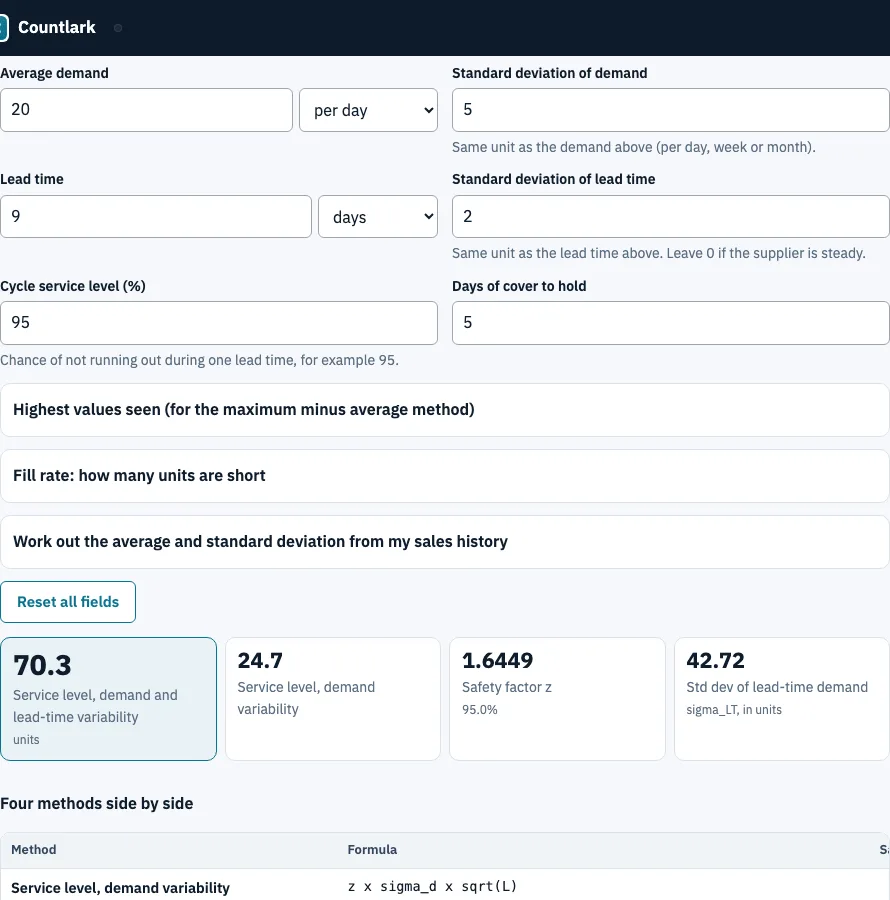
How to use the safety stock calculator
- Open the One item tab. Enter Average demand and choose per day, week or month.
- Enter the Standard deviation of demand in the same unit. If you only have a sales history, open Work out the average and standard deviation from my sales history, paste one number per period and click Use these as my demand and standard deviation.
- Enter the Lead time in days or weeks and its Standard deviation of lead time (0 if the supplier is steady).
- Type the Cycle service level (%), for example 95.
- Read the table Four methods side by side. For the maximum-minus-average method, open Highest values seen and enter the highest demand and longest lead time.
- Open Fill rate: how many units are short, enter the order quantity and read the fill rate and units short per cycle, or choose a target fill rate.
- For many items, switch to List of items, paste CSV with a header row or click Use my stock list or Load sample data, and check the matches under Check the columns.
Export with Download CSV, Download Excel (.xlsx) or Print. The list export has a frozen header, filters and the reorder point as a formula. Excel files cannot be read on import: save them as CSV first.
What is the formula for safety stock?
With a service level, safety stock is z × the standard deviation of demand over the lead time, where z is the number that matches the service level (95% gives 1.6449). The complete version also counts variation in lead time: z × √(L × σd² + d² × σL²). The calculator shows it next to three simpler methods.
Worked example: demand 20 units a day (σd 5), lead time 9 days (σL 2), 95% service level.
| Method | Formula | Safety stock |
|---|---|---|
| Service level, demand variability | z × σd × √L | 24.67 |
| Service level, demand and lead-time variability | z × √(L × σd² + d² × σL²) | 70.27 |
| Maximum minus average | (max demand × max lead time) − (average demand × average lead time) | 180 |
| Days of cover | days × demand per day | 100 |
The maximum method uses a highest demand of 30 and a longest lead time of 12; days of cover uses 5 days. For the second method the standard deviation of lead-time demand is √1825 = 42.72, so safety stock is 70.27 and the reorder point is 20 × 9 + 70.27 = 250.27 units. Common z values: 90% 1.2816, 95% 1.6449, 97.5% 1.9600, 99% 2.3263, 99.9% 3.0902.
How do I get the standard deviation from my sales history?
Paste one number per period, pick day, week or month, and the page returns the average and the sample standard deviation (n − 1). For 12, 15, 9, 14, 11, 13, 10 and 40 the average is 15.5 and the standard deviation 10.10. The 40 is flagged as an outlier, lying outside 1.5 times the interquartile range, so check it before you rely on the result.
The page also warns when there are fewer than 12 periods, when 30% or more of the periods are zero (intermittent demand), and when the second half of the history differs from the first by more than 25%. A weekly standard deviation is divided by √7 to get the daily one.
What is the difference between cycle service level and fill rate?
Cycle service level is the chance of not running out during one order cycle. Fill rate is the share of demanded units delivered from stock. With an order quantity of 200 and a lead-time spread of 42.72, a 95% cycle service level gives 0.89 units short per cycle and a fill rate of 99.55%. A 99% fill rate needs only z = 1.2868, a safety stock of 54.97 and a cycle service level of 90.09%. Fill rate is 1 − σLT × L(z) ÷ Q, where L(z) is the unit normal loss function.
Where the formulas come from
Wikipedia, Safety stock (read 25 October 2026): the z formula, the lead-time version and the fill-rate relation. The NC State tutorial on reorder points (dated 30 January 2011, read 25 October 2026) separates cycle service level from fill rate. We could not read the MIT PDF or the NetSuite page, so they are not cited. The calculator assumes demand per period is roughly normal and independent, and lead time independent of demand.
Frequently asked questions
What is safety stock?
Safety stock is the stock you hold above the demand you expect during lead time, so a late delivery or a sudden rise in orders does not leave shelves empty. Its size depends on how much demand and lead time vary and on the service level you choose.
What is the difference between safety stock and cycle stock?
Cycle stock is what gets used up between deliveries. Safety stock sits on top as a reserve, so on average it stays on the shelf and is only drawn on when demand or supply runs unusually.
Why is safety stock important?
Without it, a delivery delay or a spike in orders turns straight into a stock-out, which means lost sales. It lets you plan for normal variation instead of reacting to it. Treat the result as a starting point and compare it with your real stock-outs.
What is the difference between buffer stock and safety stock?
The two terms are often used for the same reserve, but some companies give buffer stock a narrower meaning, so check your own definition. This page calculates safety stock as defined above.
What is the 50% rule for safety stock?
We found no standard formula by that name in the sources we read (Wikipedia, IBM, Zoho). If someone quotes a percentage rule of thumb, enter it as days of cover and compare it with the other three methods.
When do these formulas fail?
They assume roughly normal, independent demand. Intermittent or lumpy demand, strong trends or seasons, and supplier delays that hit many items at once break that, so use the result as a starting point.
Can I calculate safety stock in Excel?
Yes. Find z with NORM.S.INV(service level), for example =NORM.S.INV(0.95)SQRT(95^2+20^2*2^2), which gives about 70.27 for the example above. The list export of this page carries the reorder point as an Excel formula.
Related tools
- Reorder point calculator: add the safety stock to demand during lead time and get the order trigger.
- ABC inventory analysis: rank items by value to decide which ones deserve the most careful settings.
- Inventory aging report: find stock that has sat too long.
- Inventory management app: record stock in and out so your demand history is ready.
- Small business inventory software: stock list, cost, supplier and purchase order in one place.
- Inventory count sheet: use it to run a blind count and see the variance.