Reorder Point Calculator
Enter demand and lead time to get the reorder point, or paste your whole list for every SKU. Each step is shown with your numbers.
Free · runs in your browser · nothing is uploaded
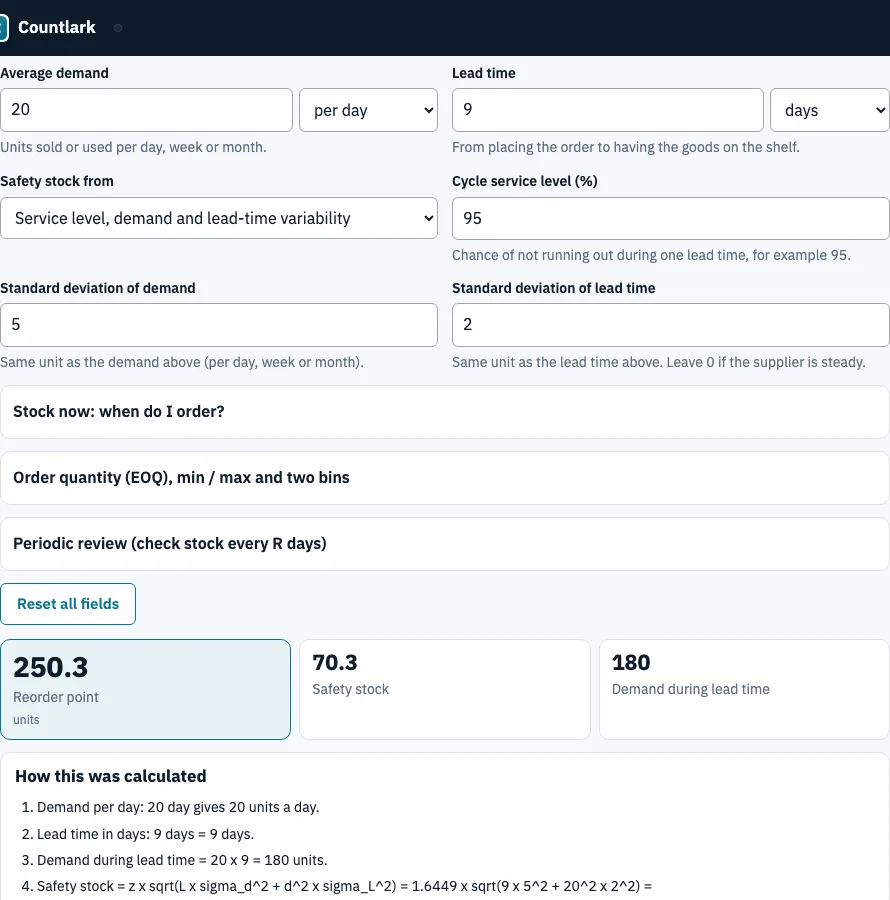
How to use the reorder point calculator
- Open the One item tab. In Average demand, type how many units you sell and choose per day, per week or per month.
- Enter the Lead time in days or weeks. A week counts as 7 days.
- Under Safety stock from, choose A number I type if you already know your buffer, or one of the four calculated methods.
- For the service level methods, type the standard deviations and the service level in %.
- Read the reorder point, then open How this was calculated to check each step.
- Optional: under Stock now: when do I order?, enter on hand, on order and backordered to see whether to order now, or on which date.
- For many items, switch to List of items. Paste CSV with a header row, click Use my stock list, or click Load sample data, and fix any wrong match under Check the columns.
The list table shows status, reorder date and order quantity per row. In the sample at a 95% service level, 7 of 10 items show Order now: Ceramic mug blue has a position of 48 against a reorder point of 125.6 (safety stock 34.6). Export with Download CSV, Download Excel (.xlsx) or Print. The Excel list has the reorder point as a formula. Excel files cannot be read on import, so save them as CSV first.
How do I calculate the reorder point when demand or lead time is variable?
The reorder point is demand during lead time plus safety stock. When demand or lead time varies, the safety stock is z × √(L × σd² + d² × σL²), where z comes from your service level (95% gives 1.6449), d is demand per day, L is lead time in days, and σd and σL are the standard deviations. The page does this arithmetic for you.
Worked example: demand 20 a day (σ 5), lead time 9 days (σ 2), 95% service level.
- Spread of lead-time demand: √(9 × 25 + 400 × 4) = 42.72 units.
- Safety stock: 1.6449 × 42.72 = 70.27 units.
- Reorder point: 20 × 9 + 70.27 = 250.27 units.
The panel The same item with each safety stock method gives these reorder points for the same item (highest demand 30, longest lead time 12, 5 days of cover, typed safety stock 30):
| Safety stock from | Safety stock | Reorder point |
|---|---|---|
| A number I type | 30 | 210 |
| Service level, demand variability | 24.67 | 204.67 |
| Service level, demand and lead-time variability | 70.27 | 250.27 |
| Maximum minus average | 180 | 360 |
| Days of cover | 100 | 280 |
How does the reorder point relate to the EOQ?
The EOQ decides how much to order, and the reorder point decides when. EOQ = √(2 × D × S ÷ H), with D annual demand, S the cost of one order and H the holding cost per unit per year. For D = 10,000, S = 40 and H = 5 it is 400 units: 25 orders a year, one every 14.6 days, with ordering cost 1,000 and holding cost 1,000.
With an order quantity, the page also gives min and max levels. At 20 a day, a 5-day lead time, safety stock 10 and an order of 400, the min level is 110, the maximum position 510 and the highest shelf stock after a delivery 410. Two bins hold 110 in reserve and 300 in the main bin.
Where the formulas come from
Reorder point and safety stock: Wikipedia, Reorder point and Safety stock. EOQ: Wikipedia, Economic order quantity. All three pages were read on 25 October 2026. We could not read the NetSuite page, so we do not cite it. Every number above was produced by this page’s own code.
Frequently asked questions
What is a reorder point?
A reorder point (ROP) is the stock level that tells you to place a replacement order before you run out. This tool calculates it as demand during lead time plus safety stock.
What is the formula for ROP?
ROP = demand per day × lead time in days + safety stock. For 20 units a day, a 14-day lead time and a typed safety stock of 30, it is 20 × 14 + 30 = 310 units. Without any safety stock, 50 a day and 7 days give 350.
What is EOQ and ROP?
EOQ is the order size that balances ordering and holding costs. ROP is the stock level that triggers the order, so EOQ answers how much and ROP answers when.
How do I know when to order?
Enter on hand, on order and backorders under Stock now. If the position is at or below the reorder point, the page says order now. With 400 on hand, a reorder point of 310 and 20 a day, the gap is 90 units, which is 4.5 days, so order in 5 days.
How do I adjust reorder points for seasonal demand or high-variability products?
This tool does not model seasons, promotions or intermittent demand. For variable products, enter the real standard deviations so the service level methods add more safety stock. For a season, enter the average demand of that period and recalculate.
How do I calculate reorder points for a whole list of items?
Use the List of items tab. Paste or load CSV with a header row, set the method and service level, and read the table. Save these fields to my stock list keeps demand and lead time on the matching SKUs.
What is a par level?
A par level is the stock you want to be back up to after each order. The maximum position in the min / max block (reorder point + order quantity) plays that role, so it works as a par level calculator for an item once you enter an order quantity.
Is my list uploaded anywhere?
No. The page runs in your browser and keeps your settings and pasted list on this device only.
Related tools
- Safety stock calculator: size the buffer on its own, with four methods side by side.
- ABC inventory analysis: rank items to see which deserve the closest reorder settings.
- Inventory aging report: find stock that sits too long before you reorder it.
- Inventory management app: record stock in and out day to day.
- Small business inventory software: stock list, cost, supplier and purchase order in one place.
- Inventory count sheet: use it to run a blind count and see the variance.