Inventory Spreadsheet
Pick a business type and columns; download an Excel inventory spreadsheet with stock value and reorder formulas already in place.
Free · runs in your browser · nothing is uploaded
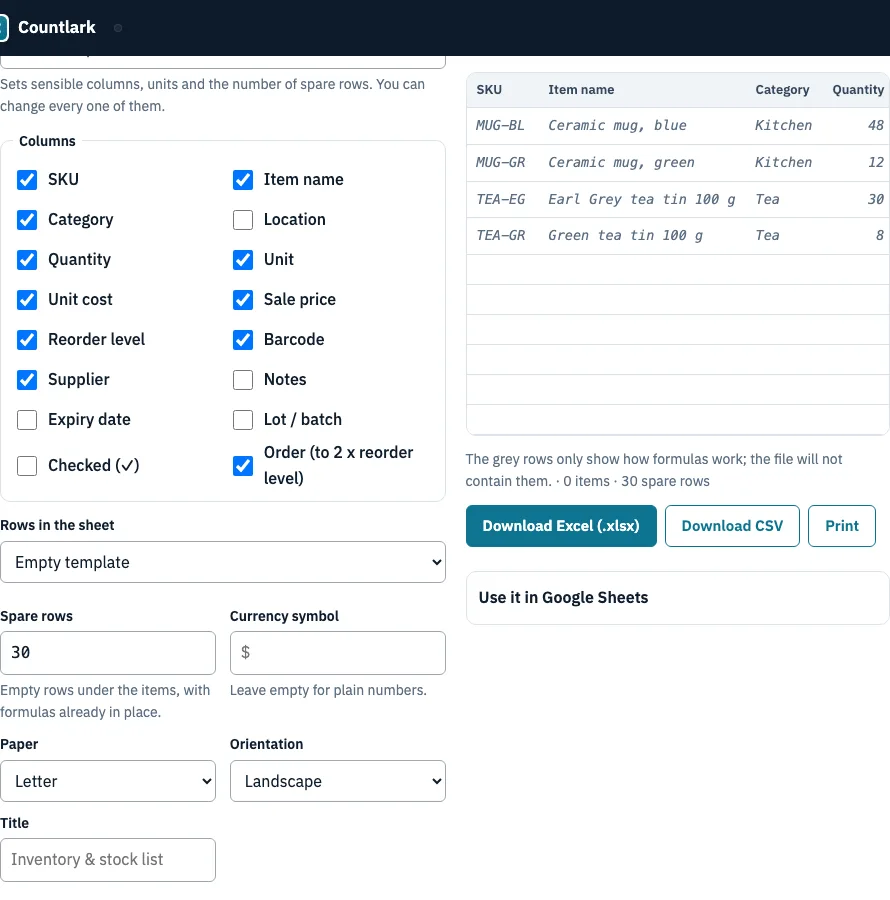
How to use the inventory spreadsheet tool
- Choose a Business type: Retail shop, Restaurant / kitchen, Warehouse, Office supplies, Workshop / parts or Home. The tool sets a starting column set for that type.
- Tick the Columns you want, such as SKU, Item name, Quantity, Unit cost or Reorder level. Leave out anything you will not track.
- Under Rows in the sheet, choose Empty template, Example rows (a small shop), My stock list from this browser, or Paste a CSV or copied cells.
- Set Spare rows, which default to a number that depends on the business type. Then adjust Currency symbol, Paper, Orientation and Title. Keep Add formulas ticked.
- Check the Preview table. With an empty template, the four grey rows only show how the formulas work. They are not in the file.
- Click Download Excel (.xlsx), Download CSV or Print. Print gives paper pages with the same columns.
- Open the file in a spreadsheet program such as Excel and type your items into the empty rows. The formulas fill in on their own, and the Total row follows any filter you apply.
For CSV, choose Comma-separated, decimal point or Semicolon-separated, decimal comma. The second style suits many Excel installations in countries that write 1,5. To move the file into Google Sheets, follow the steps in the Use it in Google Sheets panel.
What should an inventory template include?
A good inventory sheet template helps you identify each product, see how many you hold, and reorder before you run out. That means an identifier (SKU or item name), a quantity, a unit, a cost and a reorder level at the least. This tool starts from the business type you pick, so the columns match how that kind of stock is usually handled. The table shows which columns each business type starts with; you can tick or untick any of them.
| Business type | Columns it starts with | Extra columns |
|---|---|---|
| Retail shop | SKU, Item name, Category, Quantity, Unit, Unit cost, Sale price, Reorder level, Supplier, Barcode | Order column |
| Restaurant / kitchen | Item name, Category, Location, Quantity, Unit, Unit cost, Reorder level, Supplier | Expiry date, Lot / batch, Order column |
| Warehouse | SKU, Item name, Bin (the location column), Quantity, Unit, Unit cost, Reorder level, Supplier, Barcode | Lot / batch, Order column |
| Office supplies | Item name, Category, Location, Quantity, Unit, Reorder level, Supplier | Order column |
| Workshop / parts | SKU, Item name, Category, Location, Quantity, Unit, Unit cost, Reorder level, Supplier | Order column |
| Home | Item name, Category, Location, Quantity, Unit, Reorder level, Notes | Expiry date |
Worked example: the sample shop
The Excel file uses live formulas instead of pasted numbers, so results update when you change a quantity, and the file also carries a unit dropdown, number checks and an expiry-date highlight. Stock value is Quantity multiplied by Unit cost. The Reorder? column shows REORDER when Quantity is at or below the Reorder level, and only then does the Order column show 2 x Reorder level minus Quantity.
The sample shop has 12 items, 387 units in total, and a stock value at cost of 813.00. Three items need reordering:
| Item | On hand | Reorder level | Order (2 x level minus on hand) |
|---|---|---|---|
| Ceramic mug, green | 12 | 20 | 28 |
| Green tea tin | 8 | 15 | 22 |
| Cotton tote bag, black | 4 | 25 | 46 |
Rows turn amber at or below the reorder level and red at zero. The Total row uses SUBTOTAL, so after you filter the list, it adds only the visible rows.
Frequently asked questions
Frequently asked questions
Can Excel track inventory?
Yes. Excel handles a small or medium stock list well, and formulas can work out stock value and flag low stock automatically. The Excel file this page builds already has them: stock value, a REORDER flag and an order quantity, with the Total row respecting any filter you apply.
What is an inventory template, and how do I create one?
An inventory template is a prebuilt spreadsheet with the columns and formulas for recording stock, so you do not start from a blank sheet. To make one here, pick a business type, tick the columns you need (SKU, item name, quantity, supplier, location, unit cost, reorder level), keep the formulas on and download the file.
How do I make a spreadsheet for inventory?
Use one row per product and one column per detail you track, then add formulas for stock value and the reorder check. Or let the generator do it: set the options, check the preview and download the Excel file. Replace the empty rows with your items.
Is there a free inventory sheet template?
Yes. This generator makes an inventory sheet for any of six business types and downloads it as Excel or CSV. Microsoft, inFlow, Smartsheet and FitSmallBusiness also publish free template files; those are fixed layouts, while this one is built to the columns you choose.
How do I track inventory in Google Sheets?
Download the Excel file here, then in Google Sheets choose File > Import > Upload, pick Replace spreadsheet or Insert new sheet and click Import data. Check the formulas and the Unit dropdown afterwards. We did not test the import in Google Sheets ourselves, and we did not check Google’s own template gallery.
How often should I update an inventory spreadsheet?
It depends on how fast your stock moves. Fast-moving retail often needs daily or weekly updates, slower stock weekly or monthly. Pick a fixed time each week to bring the records up to date, and count high-value items more often than the rest.
When should I stop using spreadsheets for inventory?
A spreadsheet suits a manageable number of SKUs counted from one location by one person or a small team. FitSmallBusiness suggests software for thousands of SKUs, several people updating at once, multiple locations or stock that must update after every sale. For movement logs and scanning, try the Inventory Management App on this site.
What are the main types of inventory templates?
Common types are general, retail, warehouse, food and equipment templates. This generator covers six business types: Retail shop, Restaurant / kitchen, Warehouse, Office supplies, Workshop / parts and Home. Each starts with its own column set, as the table above shows.
Related tools
- Inventory list template: use it when you need printable pages of your stock list.
- Inventory count sheet: use it when you are counting shelves by hand and need a blank form to write on.
- Cycle counting planner: use it when you want to count part of your stock on a regular rotation.
- Small business inventory software: use it when your spreadsheet becomes too large or too busy for one person.
- Inventory management app: use it for stock movement logs and barcode scanning.
- Bar inventory app: use it when you track bottles, kegs and bar stock.