Inventory Management App
Find or scan an item, then Receive, Issue or Count it. Every move is logged and the last one can be undone.
Free · runs in your browser · nothing is uploaded
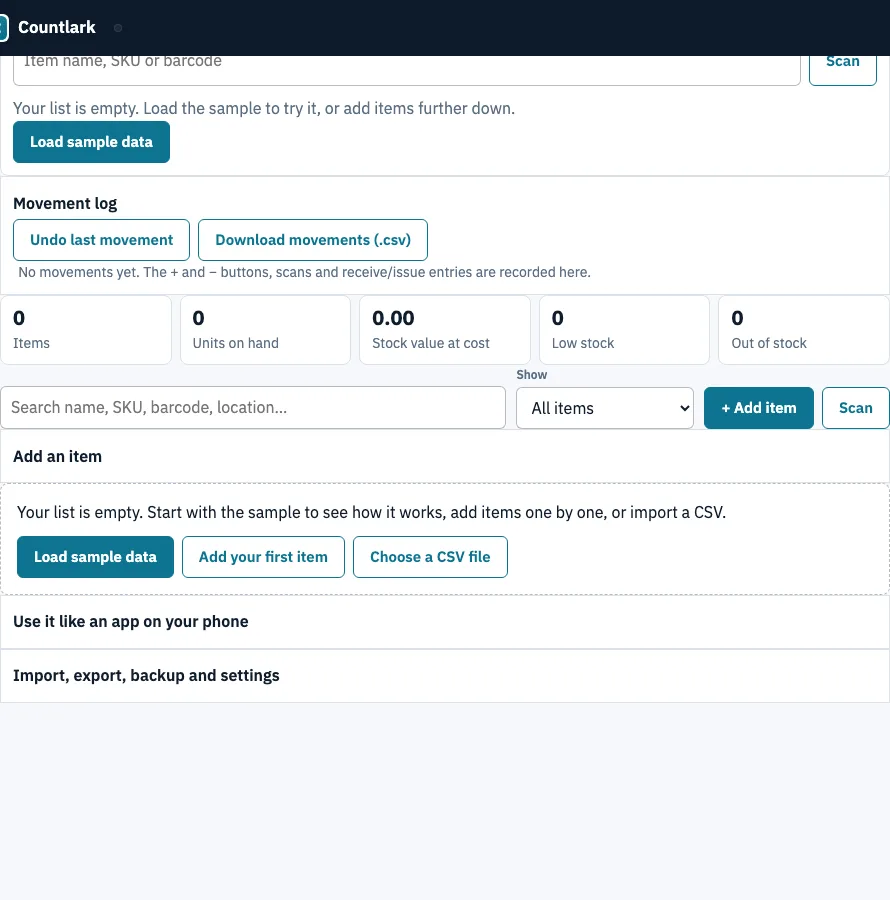
How to use the inventory management app
- Open the ‘Stock in and out’ panel at the top of the page.
- Type a name, SKU or barcode into the ‘Item name, SKU or barcode’ box, or tap ‘Scan’ to use the camera.
- Press Enter with an exact barcode or SKU to pick the item straight away, or tap a matching item button.
- Check the card showing the name, SKU, location and quantity on hand.
- Tap ‘Receive’, ‘Issue’ or ‘Count’.
- Set the quantity with the − and + steppers or the quantity box.
- Add an optional note for a PO number, job or reason.
- Read the live preview, then press the confirm button.
Typing in many items at once is quicker in the full list below the panel: ‘+ Add item’ opens a quick-add form, and each grid row has its own − and + buttons. Scan modes speed up the work. ‘Pick the item’ selects the item for you to review, ‘Add 1 per scan (stock in)’ adds one unit each time you scan, and ‘Take 1 per scan (stock out)’ removes one. The banner at the top shows how many items are at or below their reorder level and how many are out of stock. Tap it to open that list.
How do I receive and issue stock on my phone?
Pick the item by name, SKU or barcode, tap Receive or Issue, enter the quantity with the steppers or the box, and confirm. The live preview shows the change before anything is saved, and you can add a note such as a PO number first. Issue never takes stock below zero.
- Pick the item, then tap ‘Receive’ to add stock or ‘Issue’ to take it out.
- Enter the quantity with the steppers or type it in the quantity box.
- Read the preview, such as ‘On hand: 30 → 54’, before you confirm.
- Add a note if you need a PO number, job or reason. It is optional.
- Tap ‘Receive into stock’ or ‘Issue from stock’.
- If you issue more than you hold, stock stops at 0 and the message says how much was missing.
What happens to the on-hand number after each movement?
Receive adds to the quantity, Issue subtracts from it, and Count replaces it with the number you counted. Each movement is recorded in the Movement log with its time, type, item, from → to and note, and you can undo the last one. The Earl Grey tea tin in the example below shows how the numbers change.
| Step | Action | Quantity | On hand after |
|---|---|---|---|
| Start | Earl Grey tea tin on hand | 30 | 30 |
| Receive | Add stock | 24 | 54 |
| Issue | Take stock out | 5 | 49 |
| Count | Set to the counted number | 47 | 47 |
| Undo | Reverse the count | — | 49 |
Count does not add to the quantity. It sets it to what you counted, so a count of 47 turns 49 into 47. The ‘Undo’ button after the count returns the tin to 49.
When should I use Count instead of Receive or Issue?
Use Count after a physical stock check, when you know the real number on the shelf but not every movement that led to it. Receive and Issue keep a trail of each delivery and each use, so the log explains the number; Count simply resets it and records the old and new value as one Count line.
A good routine is Receive for every delivery, Issue for every use or sale, and a Count of each shelf once a week or month. If counts keep correcting the same item downward, stock is leaving without an Issue entry.
Frequently asked questions
What is an inventory management app?
It is a digital tool people use to track how much stock they hold and to record each time stock arrives, leaves or is counted. That record shows what is on hand and what needs reordering. This version runs in your browser and keeps the list on your own device.
What is the best free inventory app?
This tool is free and needs no account, because it runs in your browser and keeps the list only in that browser. Whether it is the best option depends on your needs. It suits one person on one device, so if you need several phones to share one list, look elsewhere.
What are the best inventory management apps?
This page does not rank other apps. Compare them on sync between devices, user permissions, item photos and links to point-of-sale or accounting software. This tool does not sync between phones, has no user permissions or photos, and does not connect to point-of-sale or accounting software.
What is the best app for managing store inventory?
For a shop that counts its own stock, this tool works on one device used by one person. It does not connect to a point-of-sale system, so sales will not reduce stock automatically. Record them with ‘Issue’ or the scan mode ‘Take 1 per scan (stock out)’.
What is the 80/20 rule in inventory?
The 80/20 rule, also called the Pareto principle, says a small share of items usually makes up most of the value or sales. ABC analysis ranks items by annual value, so the A items get counted and reordered most carefully. This page has no ABC report, but sorting the list by ‘Stock value’ shows which items hold the most money.
Related tools
- Inventory app: the same stock list with the editable grid first, for typing in many items at a desk.
- Small business inventory software: adds sale prices, margins, value at retail and purchase orders per supplier.
- Bar inventory app: use it for counting bottles in tenths, par levels and pour cost.
- Asset tracking app: use it to follow equipment and other assets rather than stock you sell or use up.
- Tool tracking app: use it to record who has which tool and when it is due back.
- Inventory count sheet: use it to run a blind count and see the variance.