Inventory List Template
Choose columns and paper size; print an inventory list or area checklist with tick boxes, or download it as Excel or CSV.
Free · runs in your browser · nothing is uploaded
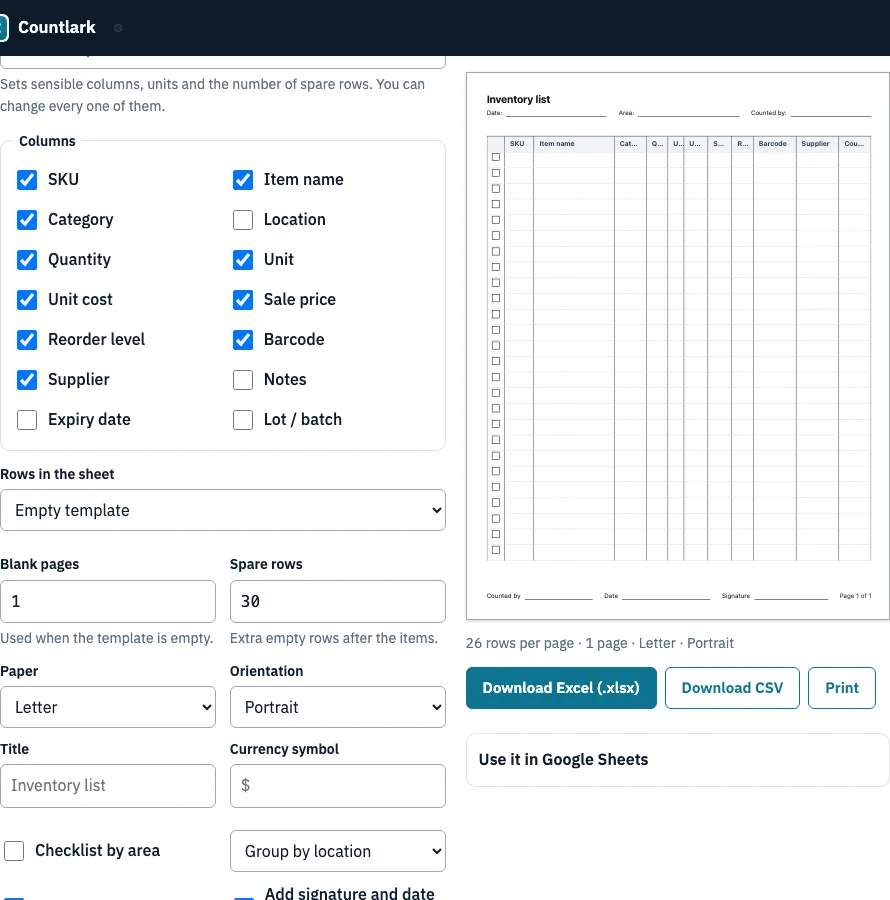
How to use the Inventory List Template
- Choose a Business type. The six presets pick the columns for you.
- Adjust Columns. Tick any of SKU, Item name, Category, Location, Quantity, Unit, Unit cost, Sale price, Reorder level, Barcode, Supplier, Notes, Expiry date and Lot / batch.
- Under Rows in the sheet, select Empty template, Example rows, My stock list or Paste a CSV.
- Set Spare rows if you want extra blank lines. Blank pages applies when the template is empty.
- Select Paper (A4 or Letter) and Orientation (Portrait or Landscape).
- Enter a Title and a Currency symbol.
- Turn on any switches you need: Checklist by area (with Group by location or Group by category), Add a Counted column, Add signature and date lines, or Fill the last page with empty rows. CSV style only matters for the CSV download.
- Check the Preview. The line beneath it shows rows per page, number of pages, paper and orientation.
- Click Print to open the browser’s print dialog with size, orientation and margins already set. Choose Save as PDF there if you want a PDF. You can also click Download Excel (.xlsx) or Download CSV.
Long text is cut with an ellipsis on paper, so every row keeps the same height. The page uses your browser’s fonts, so Japanese, Chinese and Korean item names print correctly.
How many rows fit on a printed inventory list?
A printed inventory list holds 26 rows per page on Letter portrait, 29 on A4 portrait, and 18 on both landscape sizes. The layout uses 10 mm margins and 8 mm rows to reach those counts. Checklist mode uses 7 mm rows, so a page holds 30 rows on Letter portrait and 33 on A4 portrait.
| Paper | Orientation | Rows per page (standard) |
|---|---|---|
| Letter | Portrait | 26 |
| A4 | Portrait | 29 |
| Letter | Landscape | 18 |
| A4 | Landscape | 18 |
Checklist by area adds a heading for each location or category, and a heading is never left alone at the bottom of a page. With the sample shop, the areas are A1, A2, B1, B2, C1 and C2, sorted in natural order so B2 comes before B10. Check the Preview line before you print, since it states the rows per page for your settings.
What is an inventory checklist template?
An inventory checklist template is the same list laid out by area, so a counter walks one shelf or room at a time and ticks each item off. Turn on Checklist by area and choose Group by location or Group by category. Items sit under a heading for each area, every row has a tick box, and you can add a Counted column and signature and date lines.
How do I make a simple inventory list?
A simple inventory list is a table with one row per product and one column for each fact you need to check, such as SKU, quantity or reorder level. Start by listing what you stock, then pick the few columns you check every time. Fill in the numbers from a physical count, and update them whenever stock moves.
- Write down every product you hold, one product per row.
- Give each product a SKU or a clear name so you can find it quickly.
- Choose columns for what you need to know. Quantity, location and reorder level are a sensible starting set.
- Count each item and enter the quantity.
- Mark the reorder level for each product, then update quantities as items sell or arrive.
Frequently asked questions
What is an inventory list, and what should it include?
An inventory list is a record of the stock your business holds, one product per row. Most lists carry an item name, SKU, description, quantity, reorder level and unit price. The Columns control here offers those and more, including location, supplier, barcode, expiry date and lot, so you add only what you use.
What is an inventory template, and how do I create one?
A template is a ready-made layout with the headings and rows already set, so you only type in your stock. To create one here, choose a business type or tick the columns yourself, set the title, paper and orientation, then print the page or download Excel or CSV.
Is there a free inventory sheet template?
Yes. This page makes an inventory sheet you can print or download as Excel (.xlsx) or CSV. Other free sources include Smartsheet’s 16 Word templates and Cin7’s four templates in PDF, Excel and Google Sheets; those are fixed files, while this one follows your columns and paper size.
What is the 80/20 rule for inventory?
The 80/20 rule, or Pareto principle, says roughly 80 % of sales come from about 20 % of products. The Cycle Counting planner on this site turns that split into A, B and C classes with a count schedule.
What is the difference between an inventory list and an inventory spreadsheet?
An inventory list records what you have. An inventory spreadsheet adds formulas, such as stock value and a reorder flag. This page makes the list, on paper or in Excel; the Inventory Spreadsheet page on this site builds the version with formulas.
Does Word have an inventory template?
A plain table in Word is enough for a short list of items. Smartsheet publishes 16 Word inventory templates. For longer lists, a spreadsheet is easier to manage, so use the Download Excel (.xlsx) button here and edit it in Excel.
Can Excel or Google Sheets track inventory?
Yes. Both can hold quantities, locations and reorder levels. The Excel file from this page has the list, a Counted column and print setup; stock value and reorder formulas come from the Inventory Spreadsheet page. For Google Sheets, download the .xlsx and use File > Import > Upload (we did not test that ourselves).
How often should I update an inventory list?
Update it whenever stock moves, such as when items sell or arrive, and count it on a set schedule too. FitSmallBusiness suggests setting aside time each week, with fast-moving retail needing daily or weekly updates and high-value stock counted more often.
Related tools
- Inventory spreadsheet generator: use it when you want formulas for stock value and reorder flags.
- Inventory count sheet: use it when you need a sheet for recording counts on the shop floor.
- Cycle counting planner: use it to split your stock into A, B and C classes and set a count schedule.
- Small business inventory software: use it when you are comparing ways to run stock tracking for a small business.
- Inventory management app: use it when you want to manage stock on a device rather than on paper.
- Bar inventory app: use it when you count bottles, kegs and bar stock.