Inventory Aging Report
Paste receipts and get stock value by age bucket, slow-moving and dead stock, turnover and a reserve estimate. Nothing leaves your browser.
Free · runs in your browser · nothing is uploaded
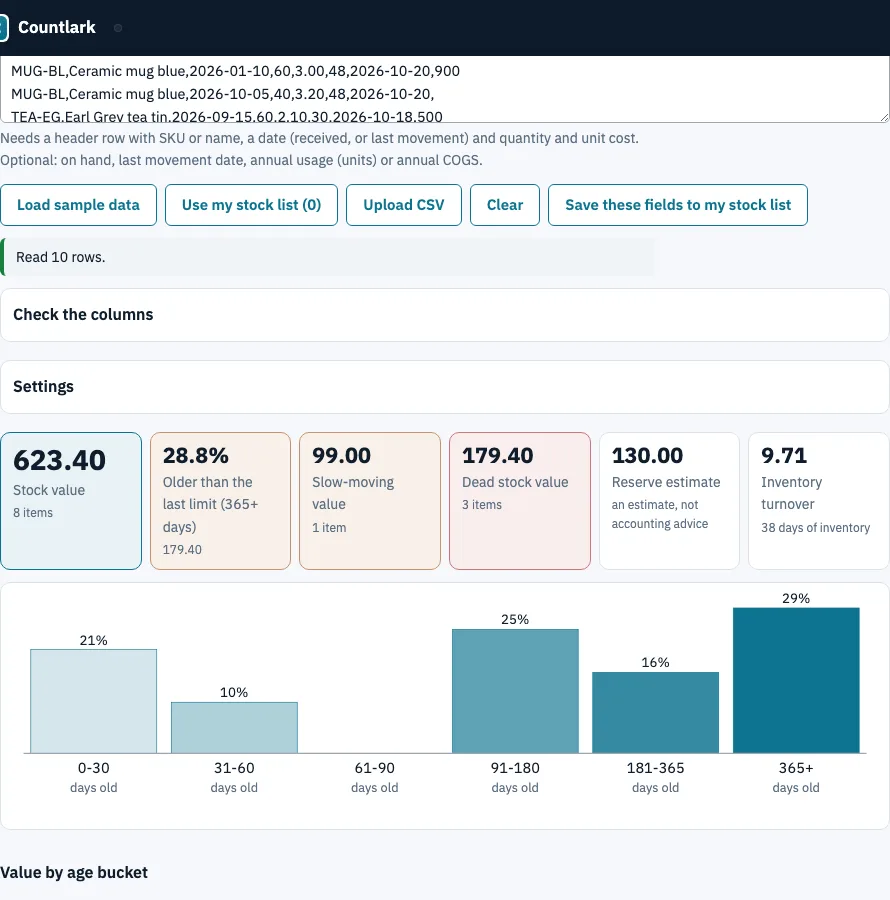
How to use the inventory aging report
- Paste a CSV with a header row, click Use my stock list, click Upload CSV, or click Load sample data. Excel files cannot be read: save them as CSV or paste the cells.
- Needed columns: SKU or name, a date, quantity and unit cost. Optional: on hand, last movement date, annual usage (units) or annual COGS. Fix wrong matches under Check the columns.
- Open Settings. Under My file has, choose one row per receipt (several rows per item) or one row per item with one date.
- Check Age as of (today by default) and Age buckets (days). The default 30, 60, 90, 180, 365 gives 0-30, 31-60, 61-90, 91-180, 181-365 and 365+.
- Set the slow-moving limit (default 90 days) and the dead stock limit (default 365 days).
- Under Obsolescence reserve (estimate), replace the example percentages with your own policy.
- Read the tiles, the chart, the bucket table, the item table and the FIFO layers list. Export with Download CSV, Download Excel (.xlsx) (buckets, items and layers sheets) or Print.
If your file has no on-hand column, tick the box to take quantities from your stock list by SKU. Dates are read as 2026-10-25, 25.10.2026 or 10/25/2026, and rows without a readable date are left out and counted in a message above the tiles.
How to calculate inventory aging?
Age is the as-of date minus the receipt date, in whole days. Each unit goes into the bucket its age falls in, and a limit belongs to its own bucket: 30 days old is in 0-30, 31 is in 31-60. When an item has several receipts, the stock on hand is taken from the newest receipts first (FIFO).
Worked example: receipts of 100 at 1.00 (1 January 2026), 50 at 2.00 (1 June 2026) and 80 at 3.00 (15 September 2026), 120 on hand, as of 25 October 2026.
| Layer | Units | Unit cost | Value | Age (days) | Bucket |
|---|---|---|---|---|---|
| 15 Sep receipt | 80 | 3.00 | 240 | 40 | 31-60 |
| 1 Jun receipt | 40 | 2.00 | 80 | 146 | 91-180 |
| Total | 120 | 320 |
The average age is (80 × 40 + 40 × 146) ÷ 120 = 75.3 days. Microsoft’s description of its own aging report also deducts issues from receipts first in, first out.
What is slow moving inventory?
Slow moving inventory is stock that has had no movement for longer than a limit you choose; dead stock is the same test with a longer limit. The page counts days since the last movement date (the age of the newest receipt, marked *, when the file has none). The default limits are 90 and 365 days.
In the 8-item sample, total value is 623.40, with 128.00 (20.5%) in 0-30 days and 179.40 (28.8%) in 365+. One item is slow-moving, Soy candle lavender (238 days, value 99.00). Three are dead stock: Cotton tote natural (390 days), Gel pen box of 12 (497) and Ribbon roll 20 m (806), together 179.40.
How do I calculate inventory turnover and days of inventory?
Turnover is annual COGS ÷ stock value; days of inventory is 365 ÷ turnover. COGS is the annual COGS column, or annual usage × unit cost. Today’s stock value stands in for the average inventory, because a file has no opening balance. For Ceramic mug blue, 900 units a year at 3.00 is 2,700; ÷ 152 gives turnover 17.8 and 20.5 days. The sample as a whole turns 9.7 times, or 38 days.
How do I estimate a reserve for obsolete stock?
Multiply each bucket’s value by a percentage you choose and add the results. It is a planning estimate, not accounting advice. With the example percentages 0, 0, 5, 10, 25 and 50, the sample reserve is 15.30 + 25.00 + 89.70 = 130.00.
Where the formulas come from
Microsoft Learn, Inventory aging report examples and logic (page dated 21 April 2026): buckets and first-in-first-out deduction. Wikipedia, Inventory turnover: turnover and days to sell. Shopify’s inventory aging report article gives average age as average inventory ÷ COGS × 365. All read on 25 October 2026.
Frequently asked questions
What is an inventory aging report?
It shows how long stock has been held, grouped into age buckets, with the value in each. It shows where cash is tied up in old stock.
What is aged inventory?
Stock held longer than is normal for its product type. It is not necessarily damaged; it sits longer than planned.
What is a good inventory age?
There is no single number, because it depends on the product. This page flags slow-moving stock after 90 days without movement and dead stock after 365, and you can change both.
What is the difference between aged, excess and obsolete inventory?
Aged stock has been held longer than expected, excess stock is above current or forecast demand, and obsolete stock is unlikely to sell. The report measures age and movement; whether stock is excess or obsolete is your judgement from the lists, helped by days of cover and the dead stock list.
How often should I run an inventory aging report?
Peer guides suggest monthly for most businesses. The page runs when you load data, so paste a fresh receipts list each time and compare.
Why do time buckets matter and how do I choose them?
Buckets turn raw ages into groups you can act on, so they should fit how long your products normally take to sell. The defaults suit many goods; fast-selling or perishable goods need shorter limits.
How do I manage aging inventory?
The report shows where the old stock is. What to do about it (price, bundle, return to the supplier, write down) is your decision, and the reserve estimate helps you size the cost.
Can I use my own stock list?
Yes. Use my stock list reads quantities and costs from the list the Countlark tracker pages share. Received dates must come from a pasted file; Save these fields to my stock list keeps annual usage and last movement date.
Related tools
- Reorder point calculator: find when to reorder the items that sell.
- Safety stock calculator: size the buffer so you do not overstock to cover variation.
- ABC inventory analysis: rank items by value to decide where to look first.
- Inventory management app: record stock in and out as it happens.
- Small business inventory software: stock list, cost, supplier and purchase order in one place.
- Inventory count sheet: use it to run a blind count and see the variance.