Cycle Counting
Rank your items into ABC classes, set counts per year, and get a dated schedule with a count list for every working day.
Free · runs in your browser · nothing is uploaded
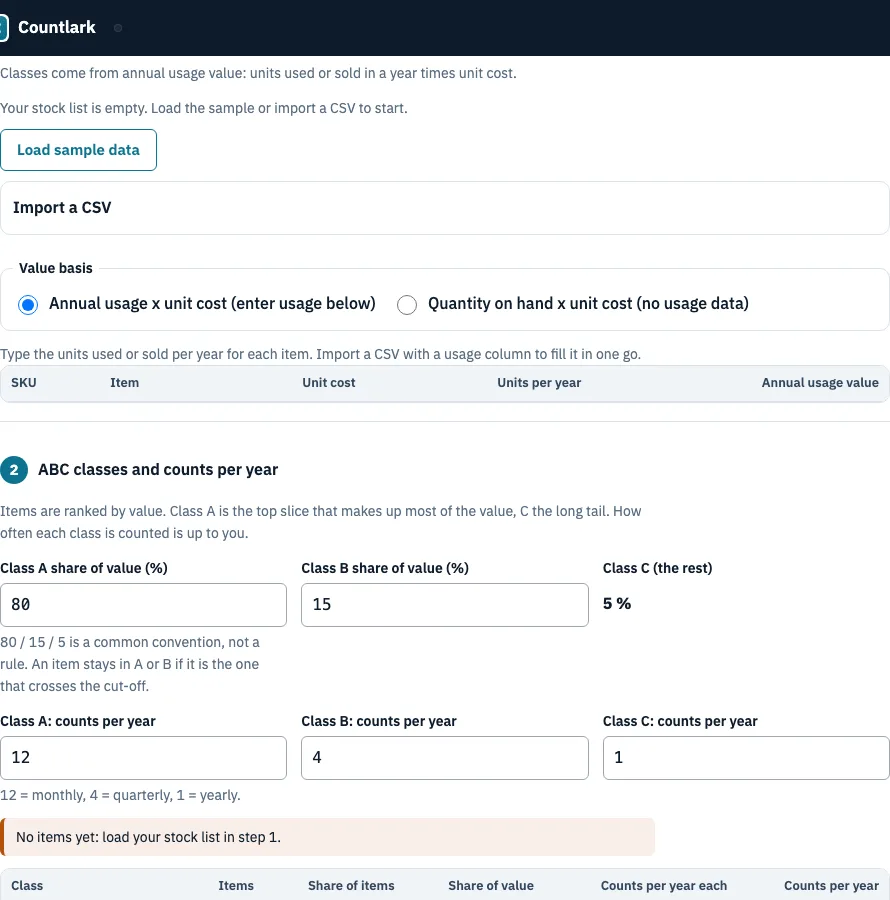
How to use the Cycle Counting Planner
- Load your items (Step 1). Click Load sample data to try the planner, or Import a CSV. A usage column such as “annual usage” is recognised. Choose a Value basis: annual usage times unit cost, or quantity on hand times unit cost if you have no usage data. Type Units per year for each item in the table where needed.
- Set the classes (Step 2). Adjust Class A share of value (default 80) and Class B share (default 15). Class C takes the rest. Enter counts per year for each class (defaults 12, 4 and 1). Check the class table and the Pareto curve. Use the Class dropdown to pin an item, or Move up a class after a bad count.
- Build the schedule (Step 3, Count schedule). Pick a Start date and a Schedule for period of 1 to 12 months. Tick your Working days (Monday to Friday by default). Enter Holidays and closed days, one date per line. Optionally set Most counts per day.
- Choose a view. Pick Calendar or List of days. Turn on Hide system quantities on the lists if counters should not see the expected figure.
- Open a day. Click a day to see its items with class, location, SKU, item and system quantity.
Use Print this day or This day (CSV) for one day. Download all days (CSV) saves every day, and Print every day (one page each) prints up to 400 days. The lists include Counted and Initials columns for recording results on paper.
What is ABC cycle counting?
ABC cycle counting divides your items into three priority classes by annual value, so the stock that costs the most gets counted most often. Class A holds few items and most of the value, while class C holds many low-value items that are counted least.
The planner sorts items from highest to lowest annual value. An item is class A while the share of total value held by the items above it is below the A cut-off, class B while it is below A plus B, and class C otherwise. An item that crosses a cut-off stays in the better class. Items with no value are class C, and ties are broken by name so the result never changes.
| Class | Share of value (default) | Counts per year each (default) |
|---|---|---|
| A | 80% | 12 |
| B | 15% | 4 |
| C | 5% (the rest) | 1 |
The 80/15/5 split is a common convention, not a rule, so change it to suit your stock.
In the sample shop (12 items, total value 813.00), 7 items are class A and hold 81.9% of the value (666.10). Three items are class B with 15.0% (122.10), and two are class C with 3.1% (24.80). That gives 7 × 12 = 84, 3 × 4 = 12 and 2 × 1 = 2 counts, 98 in total. Over 261 working days, that is 0.4 counts a day.
Worked example: the Kardex mix
A larger example uses the mix Kardex describes: 1,000 SKUs, with 100 class A items counted monthly, 250 class B counted quarterly and 650 class C counted annually. That is 1,200 + 1,000 + 650 = 2,850 counts a year, or 10.9 a day on 261 working days. With Most counts per day set to 11, 106 counts move to later days, because some days would otherwise carry 12.
How often should you cycle count?
Counts per year should follow item value, speed of movement, importance to operations and discrepancy history, so high-value items are counted most often. Published advice differs, which is why the planner makes both the class split and the counts per year inputs. Its defaults are 12 counts a year for A, 4 for B and 1 for C. The table shows what three sources say (read 25 October 2026).
| Source | Class A | Class B | Class C |
|---|---|---|---|
| DCL | about 10 % of SKUs, monthly | about 20 %, quarterly | about 70 %, once or twice a year |
| Kardex | weekly to monthly | quarterly | semiannually to annually |
| Fishbowl | weekly | monthly | quarterly |
How do you perform a cycle count?
A cycle count is a physical check of a few items against the system record, done on a set day. Before the first count, settle which items you hold and their value, how many counts each class gets, and which days are working days, since the planner needs all three.
- Take the day’s list from the planner and walk to each location shown.
- Count the units on hand. If system quantities are hidden, record only what you physically see.
- Write the figure in the Counted column and your initials in the Initials column.
- Compare the count with the system quantity. Recount any mismatch before you change a record, and find the cause.
- After a bad count, click Move up a class so the item is counted more often.
Frequently asked questions
What is cycle counting?
Cycle counting means counting a few items or locations on a regular rotation and comparing each count with the stock record, so the warehouse never has to stop for a full count. It avoids the full physical inventory that halts operations.
How often should you cycle count?
It depends on item value, how fast the item moves, how important it is to operations and its discrepancy history. In the planner, set counts per year for each class; the defaults are 12 for A, 4 for B and 1 for C. Published advice differs, so treat any split as a starting point.
What is the cycle counting process?
Choose items by value class, set how often each class is counted, build a dated schedule, count on each day and record the results. Counters go to the location on the day’s list, count the units, write the figure in the Counted column and initial the line. Recount any difference before changing the record.
What is considered a good cycle count?
No source we read gives a fixed pass mark. Kardex suggests measuring the share of counted items that match the system records and tracking whether that share improves. The Inventory Count Sheet page on this site reports this as record accuracy.
Is cycle counting better than a full physical inventory?
Cycle counting avoids the shutdown a full physical inventory needs, because only a few items are counted on any day, and errors surface in small batches through the year. A full count gives one number on one day.
What are the types of cycle counting methods?
Wikipedia lists Pareto, hybrid, usage-based, opportunity-based, statistical and geographic selection. This planner uses the Pareto method, which ranks items by annual value and splits them into A, B and C. Fishbowl describes five methods: ABC, usage-based, hybrid, opportunity-based and geographic.
What are the benefits and challenges of cycle counting?
Errors show up early, counts run during normal work and the most valuable items get the most checks; planning built on wrong counts leads to shortages and excess stock. The challenge is staff time on working days. The Most counts per day limit moves extra counts to the next day with room and marks them late.
How do you make a cycle count schedule?
Set the start date, the schedule period, your working days and holidays. The planner divides the working days in a year by each item’s counts per year and spreads the items evenly. From 2 November 2026 on Monday to Friday there are 261 working days, so an item counted 12 times a year comes up about every 22 working days.
Related tools
- Inventory count sheet: use it to write down physical counts when you count away from the planner’s lists.
- Inventory list template: use it to set up your stock list before importing it.
- Inventory spreadsheet: use it if you prefer to keep stock records in a spreadsheet.
- Inventory management app: use it when you need to track stock as sales and deliveries happen.
- Small business inventory software: use it when a small business wants a dedicated system for stock counts.
- Bar inventory app: use it when your stock is bottles and kegs behind a bar.