Barcode Scanner to Excel
Scan with your phone camera or a USB scanner, and every code becomes a row with time and quantity. Copy the rows into Excel or download the file.
Free · runs in your browser · nothing is uploaded
Barcode scanner to Excel is a free tool in your browser that turns each scan into a row you can paste into Excel or Google Sheets, or download. You can scan with a phone or laptop camera, a USB or Bluetooth scanner, or by typing and pasting codes. There is no sign-up and nothing is uploaded.
Each row holds the time, the code, its format and a quantity. An optional Item name column is filled from the stock list on this device, and you can add up to 12 columns of your own, such as Location or Counted by.
When you finish, copy the rows for Excel or download an .xlsx file in which codes are stored as text, so leading zeros survive.
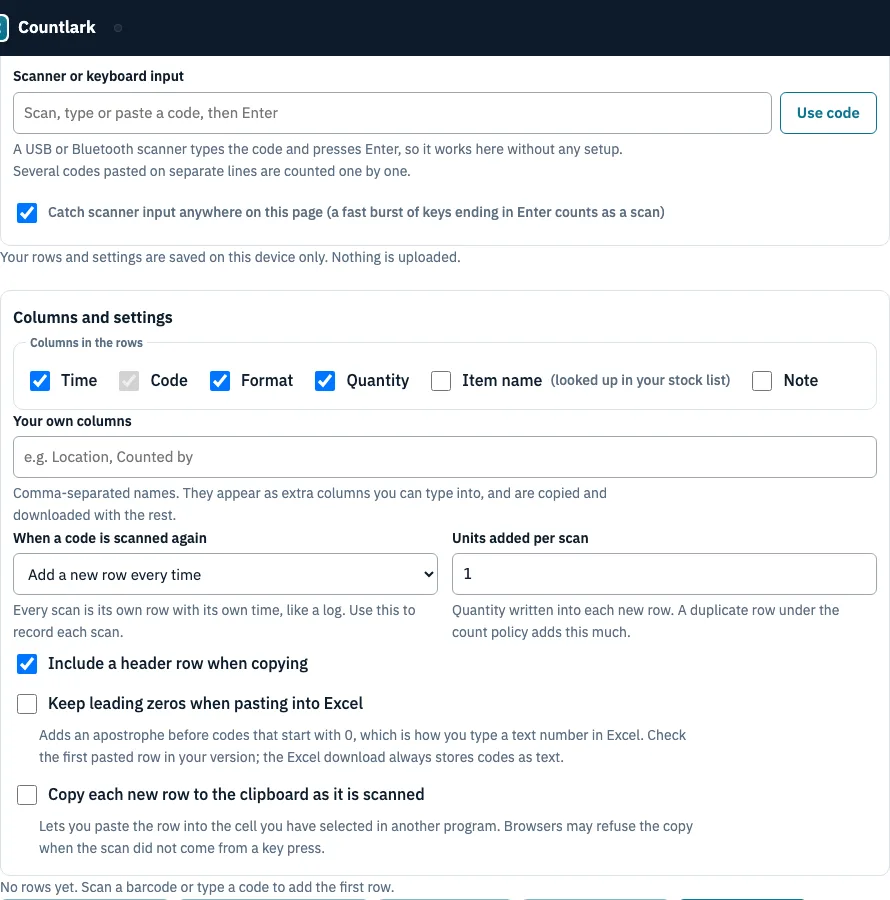
How to scan barcodes into Excel with this page
- Choose how you scan: the phone or laptop camera, a USB or Bluetooth scanner, or typing and pasting codes, several lines at once.
- Under Columns and settings, tick the columns you want and name your own, for example Location or Counted by.
- Pick what happens when a code is scanned again: Add a new row every time, Add to the quantity of the existing row, or Ignore the repeat.
- Scan. A scanner needs no click: its burst of keys ending in Enter is caught anywhere on the page. A camera needs good light and a sharp image.
- If your codes start with 0, tick Keep leading zeros when pasting into Excel and check the first pasted row in your version of Excel.
- Press Copy rows for Excel, click a cell in Excel or Google Sheets and paste with Ctrl+V (Cmd+V on a Mac). Tick the header row option for column names.
- Or press Download Excel (.xlsx) or Download CSV to get the whole log.
Copy each new row to the clipboard as it is scanned pastes every row as it arrives, but a browser may refuse that when a scan did not come from a key press; the page tells you when it does. The table shows the newest 300 rows, newest first. Copy and downloads include every row, oldest first.
How can I scan a barcode into Excel?
A USB or Bluetooth scanner set to keyboard mode types the code into the cell Excel has selected, with no software. A web page cannot send keystrokes to another program, so this page collects rows instead and you copy or download them. Choose it when you also want a time, a quantity or duplicate handling.
For the keyboard route, click the cell where the first code goes and scan. The scanner usually ends with Enter, so Excel moves down one cell for the next code. Format the column as Text first if the codes can start with 0.
Why does Excel change my barcode numbers?
Excel treats a code made of digits as a number: it drops leading zeros, can show long numbers in scientific notation and keeps only 15 significant digits. The code 0012345678905 pasted into a General cell becomes 12345678905. Set the column to Text before pasting, or download the .xlsx file.
| Where the code ends up | What you get |
|---|---|
| Pasted into a General cell | 12345678905, leading zeros gone |
| Copied with Keep leading zeros when pasting into Excel on | An apostrophe in front, Excel’s text marker, which we expect to keep the zeros (check one pasted row) |
| Excel (.xlsx) download | 0012345678905, stored as text |
How are duplicate scans handled?
The duplicate setting decides what a code that is already in the log does. Here are the same three scans, 0012345678905 twice and ABC-1 once, under each setting. UPC-A and EAN-13 spellings of one number count as the same code, so they are treated as duplicates too.
| Setting | Rows | Result for 0012345678905 |
|---|---|---|
| Add a new row every time | 3 | Two rows, each with its own time |
| Add to the quantity of the existing row | 2 | One row, quantity 2, time of the latest scan |
| Ignore the repeat | 2 | One row, the first scan only |
Frequently asked questions
Do I need special software to scan barcodes into Excel?
No. A USB or Bluetooth scanner in keyboard mode works in Excel without software, and this page needs no install, account or plan. Scanner settings such as the ending key are normally changed by scanning programming barcodes from the scanner’s manual.
Can I scan barcodes into Excel on a phone or tablet?
Yes, with the camera on this page. Scan, then copy the rows or download the .xlsx or CSV file and open it on your computer. Camera scanning needs light and focus, and a scanner is faster for hundreds of items.
How do I make the scanner jump to the next cell?
In Excel, Enter moves the selection down, so a scanner whose burst ends in Enter fills a column one code per row. If the selection moves another way, change the ending key in the scanner’s manual. This page ignores that setting and builds its own log.
Does a barcode scanner work with Excel on a Mac?
Yes. A scanner in keyboard mode types into Excel on a Mac the same way it does on Windows, ending with Enter to move down a cell. For rows copied from this page, click a cell and paste with Cmd+V instead of Ctrl+V.
Is there a free barcode scanner app that works with Excel?
This page is free and runs in your browser without sign-up. It scans with a phone or laptop camera or a USB or Bluetooth scanner and gives you the rows to copy for Excel or download. It cannot type into an open workbook.
Is there a free barcode generator for Excel?
Not here: this page reads and logs barcodes, it does not draw them. To make barcode and QR labels from a list and print them on label sheets, use the Inventory barcode labels page on this site; it is free and needs no sign-up.
Can I add a time, a quantity or my own columns?
Yes. Each row has a time on your local clock in the form yyyy-mm-dd hh:mm:ss and a Quantity. You can name up to 12 more columns and type into them. The .xlsx keeps Quantity as numbers and Time as a real date-time, so you can sort and calculate.
Is my scan log sent to a server?
No. Rows are saved in this browser only and nothing is uploaded to a server, so there is no account to create and no limit set by a plan. Use Clear all rows when you are done, or keep the log for the next session.
Related tools
- Barcode inventory app: count items against a stock list and apply the count to stock.
- Inventory barcode labels: make barcode and QR labels for items that have no code yet.
- Inventory management app: record stock in and out, not only scans.
- Inventory app: keep the stock list that fills the Item name column.
- Small business inventory software: see what a growing shop needs beyond a spreadsheet.
- Asset tracking app: follow equipment with a tag on each item.