Avery 5160 Template
Type or merge addresses onto a 30-per-sheet 5160-compatible layout, skip labels you have used, and download a PDF at true size or a Word table.
Free · runs in your browser · nothing is uploaded
This free 5160 label template turns a list of addresses into a print-ready sheet for Avery 5160 labels, which come 30 per page at 1 x 2-5/8 inches. Type or paste addresses, check the sheet in the preview, then download a PDF at true size, a Word table (.docx) or a blank Word table. It runs in your browser, so there is no sign-up and your addresses are not uploaded.
The layout is compatible with 5160, 8160 and 5260 sheets. It is not an official Avery template and Avery did not make it, so print a test page on plain paper before you load label stock. You can also merge a CSV list, skip used labels on a partly used sheet and add a barcode or QR code beside the text.
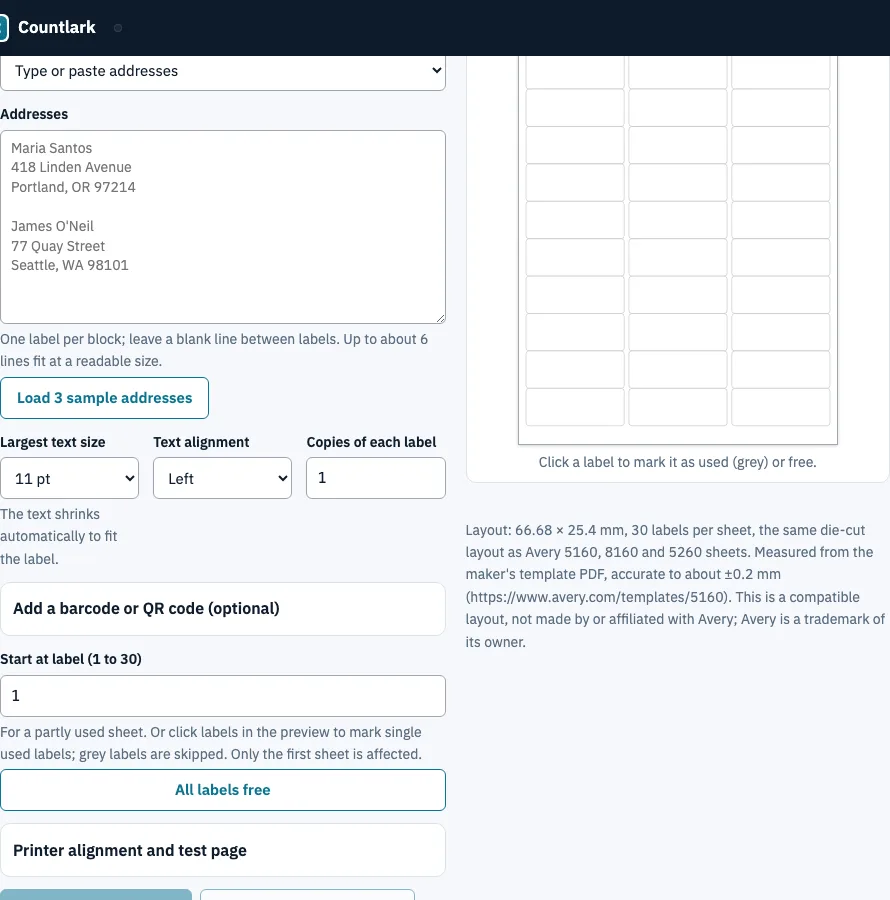
How to use the Avery 5160 template
- Under Where the labels come from, choose Type or paste addresses and put a blank line between labels. Or choose Merge from a CSV list and paste or open your list, with column names in the first row.
- For a merge, press Suggest a template from the columns. It builds the label from columns such as First Name, Address, City, State and ZIP. You can edit the template, or click a column name to add that field to it.
- Choose the Largest text size (11, 10, 9 or 8 pt). The text shrinks to fit the label.
- For a partly used sheet, enter a number under Start at label, or click single labels in the preview to mark them used (grey).
- Optionally open Add a barcode or QR code and choose Code 128 or QR code.
- Set Copies of each label (1 to 100) and check the preview.
- Press Download labels (PDF), Download as Word (.docx) or Blank Word table. The Word file holds the text of your labels in the 3 by 10 table.
Print the PDF at 100% (Actual size) on US Letter paper with Fit to page turned off. Run Download the test page (PDF) on plain paper before printing on labels.
What is the Avery 5160 format?
The 5160 is a US Letter sheet with 30 labels in 3 columns and 10 rows, each 66.68 mm wide and 25.4 mm high (2-5/8 x 1 inch). These values come from this site’s label-sheet list, measured from the maker’s template PDF at 600 dpi, accurate to about plus or minus 0.2 mm.
| Property | Value |
|---|---|
| Label size | 66.68 x 25.4 mm (2-5/8 x 1 in) |
| Labels per sheet | 30 (3 columns x 10 rows) |
| Paper | US Letter, 215.9 x 279.4 mm |
| Left margin | 4.76 mm |
| Top margin | 12.68 mm |
| Column pitch | 69.85 mm (3.18 mm gap between columns) |
| Row pitch | 25.4 mm (no gap between rows) |
Avery’s help page lists the 5160 as 30 per sheet at 1 x 2-5/8 inches and says the 8160 and 5260 use the same template. The source is https://www.avery.com/templates/5160.
How do I get Avery 5160 template in Word?
Word has the 5160 layout built in, so you can pick it without downloading anything: Mailings, Labels, Options, Label vendors “Avery US Letter”, product number 5160 (menu names can differ by version). If you want a Word file that already holds the grid, download the .docx from this page.
The Word file is a table of 10 rows by 5 columns, 3 label cells and 2 narrow gutter columns, with rows exactly 1 in high, left margin 0.1875 in and top margin 0.5 in, in Arial 10 pt. It contains text only, so barcodes stay in the PDF. We checked it by opening it with python-docx and macOS text tools, not with Microsoft Word, so print one page first.
What font size fits on a 5160 label?
Lines are set in Helvetica at the largest size up to your limit that fits the 60.7 mm text width and the 25.4 mm height. The number of lines decides, because the label is short. These sizes are computed from the label height with 11 pt as the limit.
| Lines on the label | Font size |
|---|---|
| 3 or 4 | 11 pt |
| 5 | 10.6 pt |
| 6 | 8.8 pt |
| 7 | 7.6 pt |
Below 6 pt the page warns you. Width matters as well: the 45-character line Department of Historical Records and Archives measures 80.7 mm at 11 pt, so it is shrunk to fit. Shorten long lines to keep full size.
How do I fix misaligned label templates?
Print the test page, measure how far its outlines sit from the real label edges and enter the numbers. The page moves the artwork the opposite way, which brings the text back onto the label. Offsets are rounded to 0.05 mm.
- Press Download the test page (PDF) and print it at 100% (Actual size) on plain paper.
- Hold it over a real 5160 sheet against a window.
- Measure how far the printed outline of label 1 sits to the right of the label edge, and how far below.
- Enter both numbers under Printer alignment and test page and press Apply to the offsets.
- Download the PDF again, or print a new test page, and repeat until they match.
Example: an outline 1.2 mm too far right gives an offset of -1.2 mm, so the artwork moves 1.2 mm left. Print label outlines draws the cut lines for a trial on plain paper.
Frequently asked questions
Can I download a blank Avery 5160 template instead?
Yes. Press Blank Word table for a 10-row by 5-column table with 3 label cells and 2 narrow gutter columns. It is this tool’s layout, not an Avery file, so test-print it before a full sheet. Avery’s own template page also offers blank downloads.
How do I download Avery label templates for free?
Use the downloads on this page: the PDF at true size, the Word table or the blank Word table. They are free, made in your browser and need no sign-up or add-on. They are compatible layouts, not official Avery downloads, so test-print one page before a full sheet.
Are the 8160 and 5260 the same template?
Avery’s help page says the 8160 and 5260 use the same template as the 5160, and this tool treats the three as one layout; search for any of the numbers. We cannot confirm other numbers from the information here, so check the label size before using this layout.
How to make Avery 5160 labels in Google Docs?
As far as we know Google Docs has no label-sheet picker like Word’s, so people usually install an add-on. This page works without one: merge your list here and print the PDF. We have not tested our Word file in Google Docs.
Can I print barcodes or QR codes on 5160 labels?
Yes. Under Add a barcode or QR code, choose Code 128 or QR code and the code goes beside the text. The code text can be fixed or come from a column, such as an order number. Barcodes appear in the PDF only, because the Word file holds text.
Can I make 5160 labels from an Excel list?
Yes. Copy cells from Excel or Google Sheets and paste them into the merge box, or open the sheet saved as CSV, with column names in the first row. Comma, semicolon and tab lists are detected, and an empty Address 2 leaves no gap on the label.
How do I print on a partly used sheet?
Enter a number under Start at label, or click single labels in the preview to mark them used. The free labels fill in reading order and only the first sheet is affected. Starting at label 28 puts 2 labels on sheet 1 and the third on sheet 2.
Is this an official Avery template?
No. It is a compatible layout built from measurements of Avery’s template. It is not made by or affiliated with Avery, which is a trademark of its owner, and Avery has not approved it. Print a test page on plain paper before you use label stock.
Related tools
- Inventory barcode labels: make barcode and QR labels for stock on the same sheets.
- Barcode inventory app: count stock by scanning those labels.
- Inventory app: keep the stock list your labels come from.
- Barcode scanner to Excel: log scans as rows to copy into a spreadsheet.
- Asset tracking app: print QR asset tags on the same sheets.
- Inventory count sheet: use it to run a blind count and see the variance.