Asset Tracking App
Keep one row per asset: who has it, where it is, when service is due, and what it is worth today.
Free · runs in your browser · nothing is uploaded
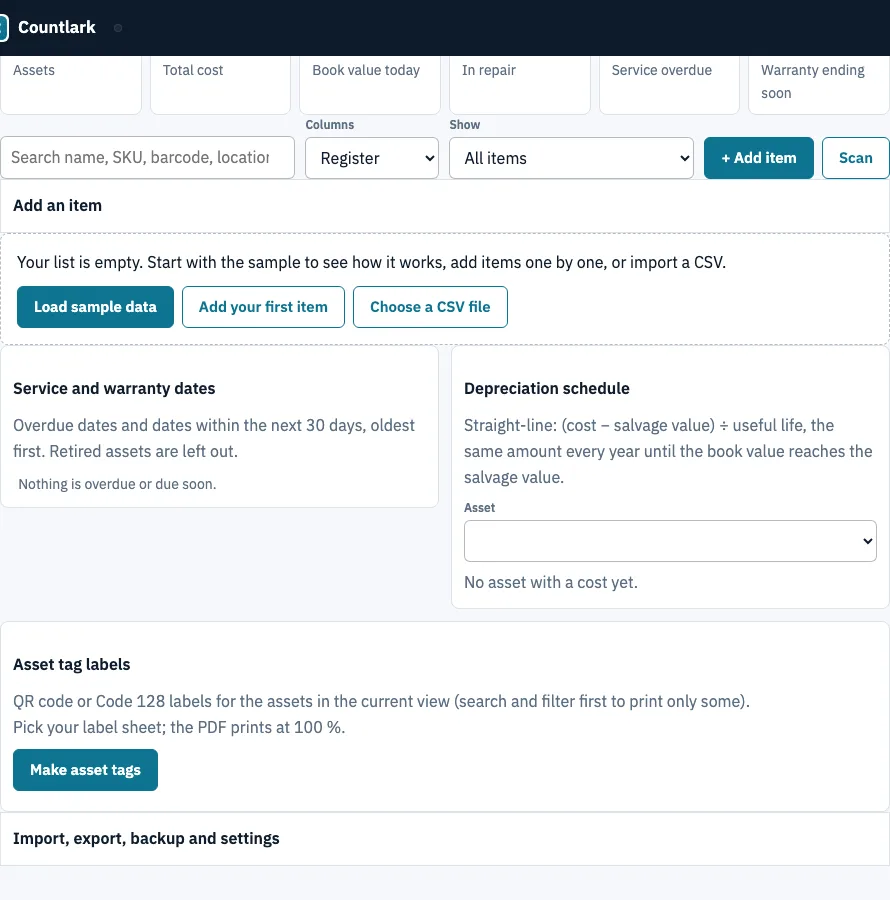
How to use the asset tracking app
- Open the page and click Load sample data to see a filled list, or click + Add item to start your own. In the quick-add form, Enter adds the item and returns you to the first box.
- Pick a view. Register shows tags, locations, status and service dates. Depreciation shows cost, salvage value, life and book value.
- Click any cell to edit it, then press Enter to save. Escape restores the old value. Click a column header to sort.
- Check the red (overdue) and amber (due soon) flags. If 30 days is the wrong window, change Due-soon window (days). The Service and warranty dates panel lists them, oldest first.
- To import a spreadsheet, open the import panel, choose a CSV file or paste cells from Excel, Google Sheets or Numbers, and click Check columns. Confirm each Goes into choice, then pick one of the three import options.
- To find an item, click Scan and point the camera at its code, or type the code into the search box and press Enter.
- Click Make asset tags to print labels for the items in the current view.
Use CSV of this view to export the visible columns after search and filter, Download Excel (.xlsx) for a workbook, or CSV with every field for everything. Click Download backup (.json) regularly, because clearing browser data deletes the list. Use Restore a backup to move it to another browser or device.
How is straight-line depreciation calculated?
Straight-line depreciation takes the cost minus the salvage value, divides that amount by the useful life in years, and writes off the same amount each year. The asset tracking app applies this to every item in its Depreciation view and shows each year in the Depreciation schedule panel.
The formula is:
(cost − salvage value) ÷ useful life per year
Book value today is cost minus the depreciation so far, and it never falls below salvage value. Before the purchase date, book value equals cost.
A laptop bought on 2024-03-15 for 1,299, with a salvage value of 100 and a 4-year life, gives (1,299 − 100) ÷ 4 = 299.75 a year. The schedule shows these book values at each year end:
| Year end | Book value |
|---|---|
| 2025-03-15 (year 1) | 999.25 |
| 2026-03-15 (year 2) | 699.50 |
| 2027-03-15 (year 3) | 399.75 |
| 2028-03-15 (year 4) | 100.00 |
On 2025-09-15, about 1.5 years in, the book value is 848.14, because the tool spreads depreciation over the calendar from the purchase date.
A useful life that is not a whole number ends with a part year. A 1,000 item with no salvage value and a 2.5-year life depreciates 400, then 400, then 200.
This is a management figure. IRS Publication 946 (read 25 October 2026) describes straight-line depreciation as subtracting salvage value and deducting the same amount each year. Tax depreciation under MACRS has its own rules, including conventions and no salvage value, so do not use this book value for a tax return.
What should an asset register include?
A useful register answers who has each asset, where it is, what state it is in and what it is worth. The Register view holds the first three and the Depreciation view the value, so one list replaces an asset tracking spreadsheet with separate tabs.
| Column | Why it matters |
|---|---|
| Asset tag, Serial no. | Identify the exact unit; the tag becomes the QR or barcode on the label |
| Assigned to, Location | Who is responsible and where to look |
| Status | In use, In repair, Stored or Retired; retired assets are no longer flagged |
| Warranty ends, Next service | Red when overdue, amber inside the due-soon window (30 days unless changed) |
| Cost, Purchased, Salvage value, Life (years) | Feed the straight-line book value |
Frequently asked questions
What is asset tracking software?
Asset tracking software keeps a record of the items a business owns, including where each one is, who holds it, its condition, and its service and warranty dates. A spreadsheet can hold the same details, but dedicated software also flags overdue work. This app does that in your browser.
What is the best app to track assets?
No single app suits every team. The right choice depends on how many items you track, whether several people need access, and whether you need item photos or accounting links. This app suits one person keeping one list in one browser, and it has no user permissions, photos, or accounting connection.
Is there any free asset tracking software available?
Yes. This asset tracking app is free and has no trial limit or sign-up. AssetTiger offers a 30-day trial up to 250 assets, then plans from $20 a month for up to 500 assets (read 25 October 2026). It includes an asset register with service and warranty due flags, a Depreciation view, and QR and barcode asset tags printed on real label sheets. Nothing is uploaded, and the list stays in your browser.
What is the best app to keep track of equipment?
Use this app to keep a register of equipment with serial numbers, locations, service dates and printed asset tags. You can type items in or import an equipment inventory template from a spreadsheet. For stock that moves in and out of shelves, the inventory management app is a better fit.
Do I need special hardware to scan barcodes?
No. The Scan button opens a camera scanner inside the page, so a phone or laptop camera can read QR codes and barcodes, and no image is sent anywhere. A USB or Bluetooth scanner that types like a keyboard also works. You can also type the code into the search box and press Enter.
How many users are included?
The list belongs to one person in one browser. There are no user accounts or permissions, so there is no seat count to manage. To share a list, use Download backup (.json) and Restore a backup, and only one person should edit at a time.
How quickly can I get started?
You can start right away. Nothing needs installing or creating. Open the page and click Load sample data to see a filled register, or click + Add item and press Enter after each entry. Importing an existing file takes a few more steps: Check columns, then choose one of the three import options.
Related tools
- Inventory app for a general list of items when you do not need service or warranty dates.
- Small business inventory software when the list is stock you sell and you need margins and purchase orders.
- Bar inventory app for bottles counted in tenths with par levels and pour cost.
- Inventory management app when you need to record stock going in and out.
- Tool tracking app for hand tools and shared kit that move between people.
- Inventory count sheet: use it to run a blind count and see the variance.