ABC Inventory Analysis
Paste your items and get class A, B and C with a Pareto chart, your own cut-offs and an export. Nothing leaves your browser.
Free · runs in your browser · nothing is uploaded
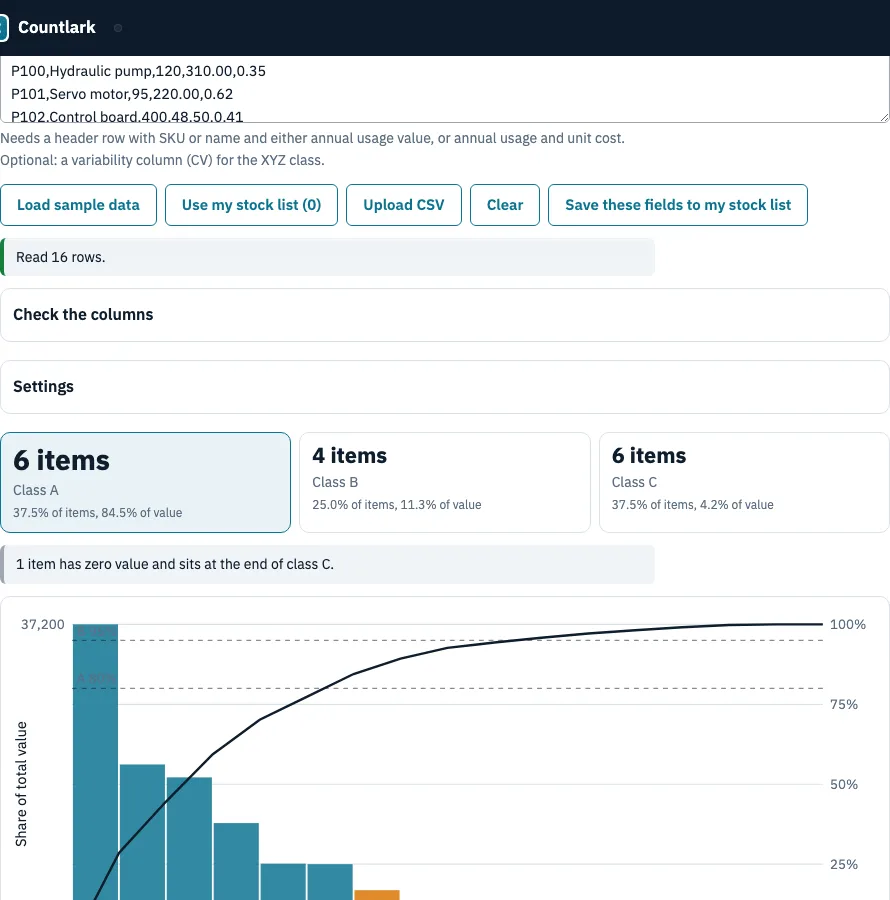
How to use the ABC inventory analysis tool
- Paste a CSV list with a header row, click Use my stock list, click Upload CSV, or click Load sample data. Excel files cannot be read: save them as CSV or paste the cells.
- The header needs SKU or name, plus either annual usage value, or annual usage and unit cost. Add a variability column (CV) for the XYZ class.
- If a column was matched wrongly, fix it under Check the columns.
- Open Settings. Choose Value to rank by, set the cut-offs (default 80 and 95) and choose where the item that crosses a cut-off goes.
- Read the class tiles, the Pareto chart, the table of items and value per class, and the full item list. Click a column heading to sort.
- In the policy table, change counts per year and service levels to see the count workload.
- Export with Download CSV, Download Excel (.xlsx) (items and summary sheets) or Print. Save these fields to my stock list stores annual usage and CV on the matching SKUs.
Your settings and pasted list stay on this device, so they are still there the next time you open the page. If the result looks odd, check the Value to rank by setting first, because a missing cost or usage column leaves rows out and the page says how many.
How to calculate ABC inventory?
Multiply each item’s annual usage by its unit cost, sort from largest to smallest, and divide the running total by the grand total. Class A takes items while the running share before the item is below the A cut-off (80%), class B continues up to the B cut-off (95%), and class C holds the rest.
In the 16-item sample, total usage value is 130,502.
| Class | Items | % of items | Value | % of value |
|---|---|---|---|---|
| A | 6 | 37.5% | 110,240 | 84.5% |
| B | 4 | 25.0% | 14,772 | 11.3% |
| C | 6 | 37.5% | 5,490 | 4.2% |
The Hydraulic pump alone, at 37,200, is 28.5% of all value. The XYZ matrix of the same sample has 4 X and 2 Y items in A, 2 X and 2 Y in B, and 2 X and 3 Z in C; the zero-usage item has no CV.
What percentage of inventory falls into each ABC category?
There is no fixed split. Wikipedia says there are no fixed thresholds and gives examples such as 20% of items for 70% of value; Fishbowl and business.org quote 10-20% of items for 60-80% of value in class A. The sample has 37.5% of items for 84.5% of value, so the cut-offs are a choice to fit to your own list.
What happens when an item lands on a cut-off?
By default the item that crosses a cut-off goes into the higher class. You can choose the lower class, which keeps each class within its cut-off. Items with the same value are never split, and zero-value items go to class C. For values 60, 25, 10 and 5 with an 80% A cut-off:
| Rule | Class A | Class B | Class C |
|---|---|---|---|
| Higher class (default) | 60, 25 | 10 | 5 |
| Lower class | 60 | 25, 10 | 5 |
Rows with a missing or negative value are left out and counted in a message.
Quantity or value: what do I rank by?
Rank by value: units alone rank a box of cheap bags above an expensive part. Value to rank by offers the annual usage value column (or annual usage x unit cost when there is none), annual usage x unit cost, or stock on hand x unit cost.
Where the method comes from
Wikipedia, ABC analysis, read 25 October 2026: classes by usage value, sorted, with cumulative percentages. Ranges are from Fishbowl and business.org, read the same day. We could not read the NetSuite, CIPS or Folio3 pages.
Frequently asked questions
What is ABC analysis in inventory?
It ranks stock by the value each item moves in a year and groups items into classes A, B and C. Class A holds the few items with the largest share of value, class C the many with the smallest.
What is the 80/20 rule in ABC analysis?
It is the Pareto principle: a minority of items usually carries most of the value. The default A cut-off here is 80%, so you can test the rule on your own list. The Pareto chart shows each item’s value as a bar and the running percentage as a line.
What are the limitations of ABC analysis?
Value ranking ignores criticality (a cheap part can stop a line), lead time and shelf life, needs a usage history, and describes one list at one moment.
How often should you update ABC classifications?
Re-run it when usage changes enough to matter, because the classes describe the list only at the moment you ran it. The page remembers your settings, so a fresh paste is quick.
What is the ABC approach to inventory control?
Classes show where to spend control effort: tight control and frequent counts for A, moderate for B, simple and rare for C. The policy table is conventional guidance, not a rule. With the example counts of 12, 4 and 1 a year, the sample needs 94 item counts a year.
Can ABC analysis be done in Excel?
Yes: sort by value, add a running total and divide by the grand total. This page does the same and exports the result to Excel, but it cannot read .xlsx files, so save your sheet as CSV or paste the cells.
What is the difference between ABC analysis and EOQ?
ABC decides where to focus control effort; EOQ and the reorder point decide how much to order and when. The class tells you how closely to watch an item.
Is ABC analysis enough, and what is XYZ?
No: it uses value only. XYZ adds how steady demand is: CV is the standard deviation divided by average demand. X is up to 0.5, Y up to 1.0 and Z above, and you can change the limits. The ABC x XYZ matrix counts the items in each combination.
Related tools
- Reorder point calculator: set the order trigger for the items that matter most.
- Safety stock calculator: size the buffer for the service level you pick for each class.
- Inventory aging report: find stock that has sat unused for a long time.
- Inventory management app: record stock in and out as it happens.
- Small business inventory software: stock list, cost, supplier and purchase order in one place.
- Inventory count sheet: use it to run a blind count and see the variance.